
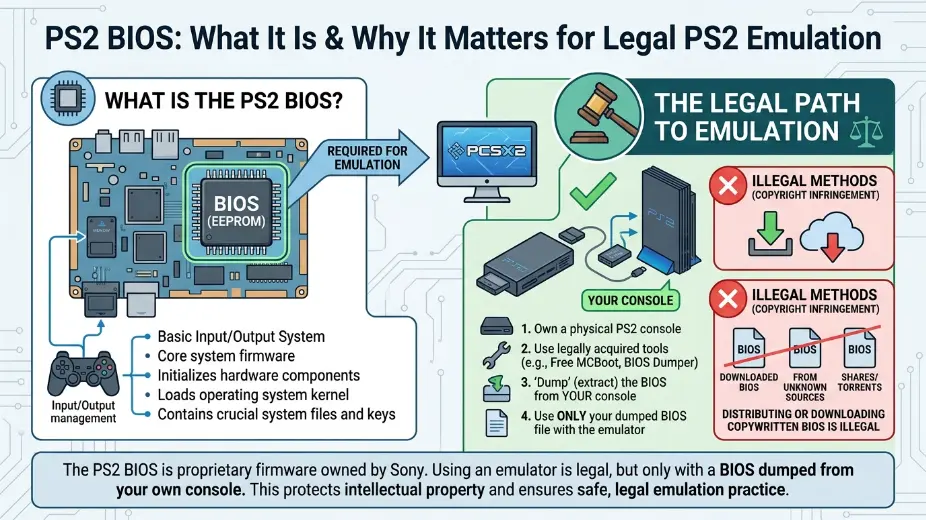
Many gamers search for PS2 BIOS when they want to play classic PlayStation 2 games on a computer. The BIOS is an important part of how a PS2 system works, and it is also one of the first things people hear about when they start learning about emulation. If you are trying to understand what it does, this guide will explain it in simple words. It will also show you the safe and legal way to think about PS2 emulation, so you can enjoy old games without confusion.
The PlayStation 2 is one of the most loved game systems ever made. It has a huge library of fun games, from racing and action to sports and adventure. Many people still want to play these games today. Some own the old discs. Some keep the old console. Others want to enjoy the games on a newer device because it is easier to use. That is where emulation comes in.
A PS2 emulator is a program that tries to act like a real PS2. It lets your computer run PS2 games in a new way. But an emulator alone is not always enough. The BIOS is part of the system software that helps the emulator work like the real machine. That is why people talk about it so often.
Still, it is important to be careful. The BIOS is copyrighted software. That means it is not something you should download from random websites. A legal and safe setup means using only files you are allowed to use, such as ones you dump from your own console. This article will keep things simple and clean, so even a young reader can understand the basics.
What Is PS2 BIOS?
The BIOS is a small but important part of the PlayStation 2 system. It helps the console start up and run in the correct way. You can think of it like the system’s first helper. Before games begin, the BIOS helps the machine know what to do.
In emulation, the BIOS can play a similar role. It helps the emulator behave more like the real PS2. That is why many emulation guides mention it. Without it, the setup may not work the way people expect.
The key thing to remember is this: the BIOS is not the same as a game. It is system software. Even though it may seem small, it is still protected. Because of that, it should be handled the right way.
Why People Look for PS2 BIOS
People often look for PS2 BIOS because they want to play classic PS2 games on modern devices. Maybe their old console no longer works. Maybe they want save states, better graphics, or easier controls. Maybe they just want one place to keep all their old games.
That is understandable. Old games have a lot of charm. They bring back good memories and can still be fun today. Emulation makes it easier to revisit them.
But many new users do not know the rules. They hear that a BIOS is needed, so they search for it online. That is where mistakes often happen. Some websites offer files that should not be shared. That can create legal and safety problems. It can also put your computer at risk if the file comes from an unsafe place.
A better path is to learn the legal way first. Once you understand the basics, you can make better choices.
The Safe and Legal Way to Think About It
If you own a PlayStation 2 console, the legal approach is to use the BIOS from your own hardware. That keeps the process tied to something you already own. It also helps you avoid shady downloads and unsafe files.
This matters because the internet is full of bad links. Some are fake. Some are packed with ads. Some may even include harmful software. That is why it is smart to stay away from random download pages.
A legal setup has a few simple goals:
- Use software you are allowed to use.
- Keep your system safe.
- Avoid broken or fake files.
- Learn how emulation works in a clean way.
When you follow those goals, the process becomes much easier to trust.
Why Safety Matters
Safety is a big deal when downloading anything from the internet. A file that looks harmless may not be safe. It may be damaged, changed, or bundled with junk. That is a problem for your device and your privacy.
Another issue is trust. Many new users do not know which sources are real and which are fake. That can lead to wasted time and bad results. A bad file can stop the emulator from working, or it can make you think your setup is wrong when the real problem is the file itself.
That is why a clean, legal approach is better. It lowers the chance of errors and keeps things simple.
What a PS2 Emulator Does
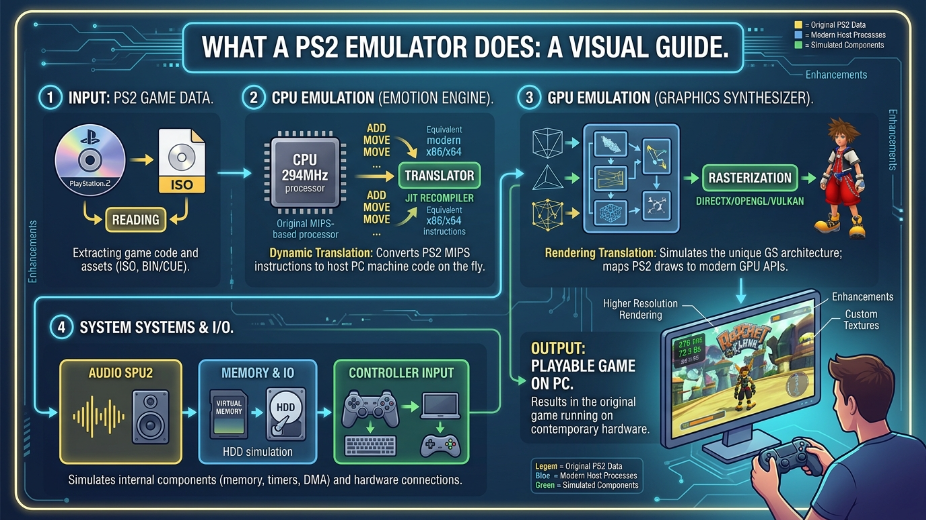
A PS2 emulator is like a translator. It tries to read old PS2 game data and make it work on a newer system. It does not turn your computer into a real PS2, but it can copy many of the PS2’s behaviors.
This is useful because modern computers are much faster than the old console. That means they can often run games with better image quality, smoother settings, and more control options.
People like emulation for many reasons. Some want sharper graphics. Some want to use a controller they already own. Some want to save progress more easily. Some want to play on a laptop or desktop instead of a TV console.
The BIOS helps make that experience closer to the original. It is one piece of a bigger system.
What You Should Prepare First
Before setting up a PS2 emulator, it helps to get organized. You will usually need:
- A computer that can run the emulator well
- A controller, if you want the classic game feel
- Your own game discs or legal game backups
- Your own BIOS dump from your console, if you are using one
- Enough storage space for game files and saves
Being prepared saves time later. It also helps you avoid confusion during setup.
A lot of people rush into emulation without reading the basics. Then they get stuck on missing files, bad settings, or broken controls. A little planning goes a long way.
Common Mistakes New Users Make
One common mistake is thinking that every file online is safe. It is not. Some sites make downloads look easy, but they are not always trustworthy.
Another mistake is mixing up the BIOS and the game itself. They are different things. A game is what you play. The BIOS helps the system start and work.
A third mistake is using the wrong emulator settings. Even if the BIOS and game are fine, bad settings can still cause lag, sound problems, or crashes.
A fourth mistake is not checking legal rules. People sometimes assume that old games are free to use just because they are old. That is not how copyright works.
If you avoid these mistakes, your setup will usually go much smoother.
Why Simple Setup Is Best
The best setup is usually the one that is easy to understand. You do not need to load your system with every fancy option at once. Start small. Get the basics working first. Then add extra settings later if needed.
This makes the whole process less stressful. If something goes wrong, you will know where the problem started. That is much better than changing many things at the same time.
A simple setup also helps beginners learn faster. Once you understand the main parts, you can handle the more advanced parts later with more confidence.
Tips for Better PS2 Emulation
Here are a few simple tips that help many users:
Use a clean and trusted emulator build.
Keep your game files organized in one folder.
Rename files in a way that makes sense to you.
Use a controller if possible, because many PS2 games were made for one.
Test one game at a time instead of changing everything at once.
Save your settings after you find something that works.
These small habits can make a big difference. They help you spend less time fixing problems and more time playing.
Why Legal Use Is the Better Choice
Legal use is better because it keeps you safe and avoids trouble. It also respects the work that went into the original console and games. People often forget that old systems were built by teams of engineers, artists, and designers. Their work still matters.
Legal use also gives you more peace of mind. You do not have to worry as much about broken files, unsafe websites, or shady downloads. You can focus on the game instead.
That is why many experienced users prefer a clean setup. It is easier, safer, and more honest.
What to Do If Something Does Not Work
If your emulator does not work, do not panic. Start with the basics.
Check whether your files are in the right place.
Check whether the emulator is pointing to the right BIOS file.
Check whether your controller is connected properly.
Check whether your game file is complete and not damaged.
Check whether your PC has enough power for the game you are trying to run.
Most problems are small. They just need patience.
It also helps to make one change at a time. If you change too many things at once, it becomes hard to tell what fixed the issue. Slow and steady is the best way.
A Better Way to Learn Emulation
The best way to learn is to treat emulation like a skill. First you learn the names of the parts. Then you learn how they work together. Then you practice with one game. After that, you improve the settings little by little.
This makes the process feel much less confusing.
A good learner does not try to rush. A good learner reads, tests, and checks carefully. That is how you get better over time.
Final Thoughts
PS2 emulation can be a fun way to enjoy classic games, but it is important to do it the right way. The PS2 BIOS is part of that setup, and it should be handled legally and safely. Instead of chasing random downloads, learn the role of the BIOS, prepare your system, and use only files you are allowed to use.
That way, you get a cleaner setup, fewer problems, and a better gaming experience. Old PS2 games still have a lot to offer, and with the right approach, you can enjoy them in a simple and safe way.
Also Read

Add a Comment