
Making a video used to feel like a big task. You needed a camera, editing software, sound, lighting, time and usually some creative experience. Now AI video tools are making the first step much easier, but many people still have one question: how does a written idea actually become a usable video?
That is the easiest way to understand Seedance. It is an AI video generator that helps turn text prompts, images, audio and video references into short cinematic clips. Instead of starting with a blank timeline, you start with an idea and a few clear inputs.
Seedance in Simple Words
Seedance is designed for people who want more control than a basic text-to-video tool can offer. A normal prompt may describe the scene, but it does not always give enough information about the exact product, character, camera movement or mood.
Seedance supports multiple reference types. You can use text to describe the scene, images to guide the look, video references to guide motion, and audio to guide sound or rhythm. This makes the process easier to understand: each input works like a clue for the final video.
Think of it like giving directions to a designer. If you only say “make a product video,” the result may be too broad. If you add a product image, a camera direction, a mood and an audio cue, the idea becomes much clearer.
What Can You Upload?
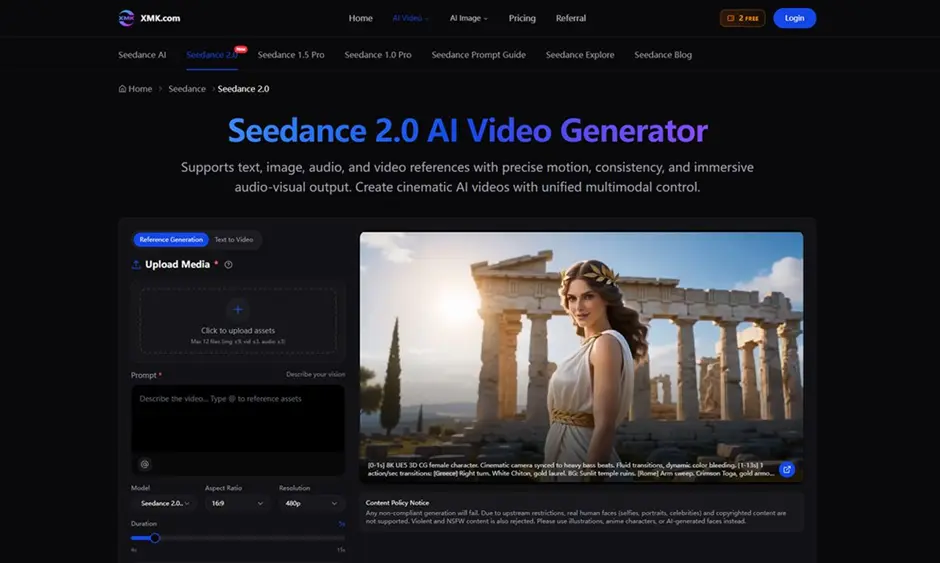
The Seedance workspace allows users to upload media assets and write a prompt. The page supports text, image, video and audio references, with limits for uploaded files. These inputs help shape the generated clip.
An image can act as a visual reference. A video can help explain the type of movement or camera style you want. Audio can support timing, atmosphere or sound design. The prompt explains how everything should come together.
This is useful because AI video is not only about what appears on screen. It is also about how the camera moves, how the subject behaves, how the scene feels and how the sound matches the moment.
A Simple Example
Imagine you want to create a short product video for a new desk lamp. Without references, you might write: “Create a cinematic desk lamp video.”
That may work, but it is still vague. A better Seedance workflow would be:
– Upload a clear product image of the lamp
– Add a short prompt describing warm evening light
– Ask for a slow close-up camera move
– Use a calm audio reference or describe soft ambient sound
– Choose the aspect ratio and duration for the final platform
Now the AI has a clearer job. It knows what the lamp looks like, how the shot should move, what mood to create and how long the clip should be.
This is where Seedance AI Video Generator becomes practical for everyday content work. It helps users move from a rough idea to a more directed short video.
Why References Matter
References are important because they reduce guessing. If you are making a brand video, the product needs to stay recognizable. If you are making a social media clip, the motion needs to catch attention quickly. If you are making a story scene, the subject and mood need to stay consistent.
Seedance 2.0 highlights stronger multi-reference image consistency, precise motion control and improved audio-video synchronization. In simple terms, that means users can guide the look, movement and sound of the video with more information than text alone.
For creators, this can help when turning a still image into a moving scene. For marketers, it can help when testing product ads or campaign visuals. For filmmakers, it can help with early previsualization before a full production begins.
Where People Can Use Seedance
Seedance can fit many simple video tasks. A social media creator can use it to make short clips for TikTok, Reels or YouTube Shorts. A small business can test product visuals before planning a full shoot. A marketing team can create campaign variations using the same product image or brand style.
It can also help with creative planning. If a filmmaker wants to test a camera move, a reference video can help explain the direction. If a designer wants to animate a concept image, image-to-video can make the visual feel more alive. If a brand wants consistent short clips, references can help keep the style closer across different outputs.
The key point is that Seedance is most useful when the user has a clear goal. A better brief usually creates a better first draft.
How to Get Better Results
Start with one simple idea. Do not try to make a full movie in one prompt. A short scene, product reveal, social hook or visual test is easier to guide.
Use strong reference assets. A clear image, clean video reference or useful audio cue can make the result easier to control.
Write the prompt like a short instruction. Include the subject, action, camera movement, lighting, mood and ending. For example: “A close-up shot of a glass perfume bottle on a marble table, slow dolly-in camera movement, soft golden light, luxury commercial style.”
Choose the right format. Vertical video works better for mobile content. Widescreen works better for presentations, websites and campaign previews.
Review the result like an editor. Check whether the subject stayed consistent, whether the movement feels natural and whether the sound fits the scene.
What to Remember Before Publishing
AI video still needs human review. A generated clip may look good, but it should still be checked for brand fit, product accuracy, visual consistency and content policy requirements.
Seedance also notes restrictions around unsupported real human faces, copyrighted content, violent content and NSFW material. For safer results, users should work with original assets, product images, illustrations, anime characters or AI-generated faces when needed.
Final Thoughts
The easiest way to understand Seedance is this: it helps turn creative instructions and reference materials into short AI videos.
For beginners, it makes the process less technical. For creators, it gives more control over motion and style. For marketers and small teams, it can help test visual ideas before spending time on larger production.
If you want to try AI video without starting from complex editing software, begin with one clear prompt, one strong reference image and a short video goal. That simple setup is often enough to create your first useful Seedance concept.
Also Read

Add a Comment