
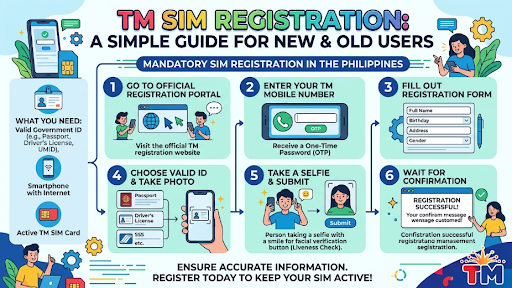
If you are looking for a clear guide on tm sim registration, this article will help you understand the full process in simple words. Many people feel confused when they first hear about SIM registration, but the truth is that it is not hard at all. You only need the right details, a valid ID, and a few minutes of your time. TM users in the Philippines can register through Globe’s online registration page or the GlobeOne app, and the SIM Registration Act applies to local users, foreigners, and even corporate accounts.
SIM registration is now part of everyday mobile use. It helps keep your number active and supports a safer mobile space for everyone. If a SIM is not registered, it may be deactivated under the law, so it is better to finish the process early and avoid problems later.
Why TM SIM Registration Matters
TM is one of the most used mobile brands in the Philippines. Many people choose it because it is affordable and easy to use. But like other SIM cards, it now needs proper registration. The goal is simple: to reduce scam messages, fake accounts, and other misuse of mobile numbers. This is why the government made SIM registration a requirement for all users.
For many users, the biggest benefit is peace of mind. Once your SIM is registered, you can keep using it without worrying that it will suddenly stop working. It also makes it easier to recover your number if you need help in the future. That is why it is smart to register as soon as possible instead of waiting until the last minute.
Another good reason to register is convenience. The process is online, so you do not need to line up for hours. In most cases, you can finish it from your phone, home, or computer. Globe’s current process for TM and Globe users starts with entering the mobile number, receiving an OTP, and then filling out the required form.
What You Need Before You Start
Before you begin, make sure you have a few things ready. The registration process becomes much easier when you prepare first. Globe’s FAQ says that accepted IDs include a passport, driver’s license, national ID, BIR ID, UMID, postal ID, SSS ID, and PRC ID.
You should also keep these items near you:
Your TM SIM card number
A working phone that can receive a text message
A stable internet connection
A valid ID
A clear selfie if the form asks for one
The registration page usually asks for your number first. Then it sends an OTP to confirm that you really own the SIM. After that, you fill in your personal details, upload the required ID, and review your information before submission.
If you are registering for a child, the SIM must be registered under the name of the parent or legal guardian. If you are a foreign national, Globe’s FAQ says you also need to register, and tourists may need a passport, proof of address, and a return ticket.
0997 what network? A Simple Answer
Many readers search for 0997 what network because they want to know which provider uses that prefix. Current Philippines prefix guides list 0997 under Globe Telecom or TM. That means a number that starts with 0997 is usually tied to Globe or Touch Mobile.
This matters because some people check the network before calling or texting. In the Philippines, network prefixes can help you guess which company issued the number. Still, the safest move is to treat the prefix as a guide, not the only proof. If you are unsure about a number, it is best to confirm through the provider or the person using it.
For TM users, this is also a good reminder that SIM registration and network identification are related but not the same thing. The prefix tells you the network. Registration tells the network who owns the SIM. Both are important, but registration is the one that keeps your line active under the law.
Step-by-Step TM SIM Registration
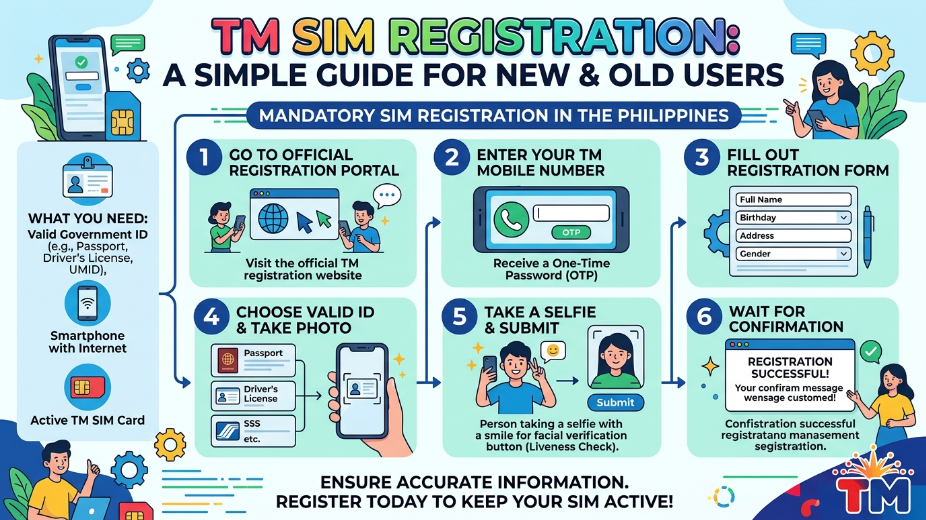
The TM registration process is simple when you follow the steps in order. Globe’s official pages show that TM users can register through the Globe SIM registration portal or the GlobeOne app. The process starts by entering your number, then verifying it with an OTP, and then completing the form.
Step 1: Open the official registration page
Go to the official TM or Globe registration page. Do not use random links from social media or unknown messages. Using the official portal helps protect your details. Globe states that TM, Globe Mobile, and Globe at Home Prepaid WiFi users can use its registration system.
Step 2: Enter your mobile number
Type your TM number carefully. A small typo can send the OTP to the wrong number or stop the process. After that, you will receive a one-time password on your phone. This code proves that the number belongs to you. Globe’s step-by-step guide says the OTP is used during validation before you continue.
Step 3: Fill out your personal details
After the OTP is verified, enter your name, birthday, address, and other asked details. Make sure your information matches your ID. If the details do not match, your registration may fail or take longer to review. That is why it is always better to check everything before you press submit.
Step 4: Upload your ID and selfie
Next, upload a clear photo of your valid ID. Some users may also need to take a selfie for identity checking. The goal is to confirm that the SIM owner and the registration details are the same person. Globe’s process includes ID and selfie submission as part of the online flow.
Step 5: Review your details
Before you finish, review every part of your form. Check the spelling of your name. Check the number. Check the birthday. Check the ID number. Small mistakes can cause delays. This last review step is one of the most important parts because it gives you a chance to fix errors before submission.
Step 6: Submit and save the reference
When everything looks correct, submit your form. After that, save any confirmation page, reference number, or message you receive. This can help later if you need proof that you already registered. Once the process is done, your SIM should be ready for continued use under the registration rules.
Common Mistakes People Make
A lot of users run into problems because of small mistakes. The good news is that most of these can be avoided.
One common mistake is using the wrong website. Some fake pages look real, but they are not official. That can put your personal details at risk. Always use the known TM or Globe registration route. Globe’s public pages point users to its official portal and app for registration.
Another mistake is entering an old or inactive number. If you are trying to register the wrong SIM, you may not receive the OTP. Always double-check the number before starting. The OTP step is important because it confirms that you control the SIM.
A third mistake is uploading blurry ID photos. If the image is unclear, the system may reject it. Use a bright place and take a clean photo. Make sure the full ID is visible and not cut off. That simple step can save a lot of time.
Some users also forget that the name on the form must match the name on the ID. That mismatch often causes delays. If the SIM belongs to a minor, the parent or guardian should register it instead.
What Happens After You Register
Once you finish the process, your SIM should stay active as long as it meets the registration rules. Globe’s terms explain that failure to comply with the SIM Registration Act can lead to automatic deactivation. That is why saving your confirmation and keeping your details correct is so important.
After registration, you can continue using calls, texts, and data as normal. You may also find it easier to manage your account later because your details are already in the system. For many users, this is the biggest advantage. It gives them a line that is both active and properly recorded.
If you ever change your number, replace your SIM, or move to another device, you should check whether any new registration step is needed. Globe’s FAQ says that some cases, such as SIM replacement or moving from one SIM setup to another, may need updated handling.
Who Needs to Register?
The short answer is: almost everyone who uses a SIM in the Philippines. Globe’s FAQ says the SIM Registration Act covers locals, foreigners, and corporate entities that use SIMs purchased in the country. This includes mobile phones and modems.
That means the rule is not only for prepaid users. It also applies in other cases based on the provider’s registration system. Globe’s public pages note that Globe Postpaid and Platinum customer details are already handled in the database according to the law, while TM and prepaid users use the registration portal.
For foreigners, the process can be different depending on the reason for the stay. Tourists may need more documents, and the registered SIM may have a shorter validity period. That is why it is always smart to read the provider’s latest FAQ before starting.
How TM SIM Registration Helps Users
TM SIM registration is not only a rule. It also helps the user in real life. It can make your number safer. It can reduce the risk of scam use. It can help you keep control over your own line. It also gives telecom companies a better way to protect users and handle support issues.
For everyday users, the process is best seen as a small task with a big benefit. You spend a few minutes today, and you avoid a lot of stress later. You also keep your line ready for school, work, family calls, online shopping, and banking messages. In a time when mobile numbers do so much, keeping your SIM registered is just basic digital care.
Tips for a Smooth Registration
Here are a few simple tips to make things easier.
First, use a strong internet connection. A slow connection may cause page errors or stop the form from loading. Second, charge your phone before you start, so it does not turn off in the middle of the process. Third, prepare your ID before opening the form. This saves time and keeps you from rushing. Fourth, make sure the SIM number you enter is active and able to receive OTP messages.
It also helps to do the process in a quiet place. That way, you can check each step carefully. If you are helping an older family member, guide them slowly and read each field before tapping next. A careful start usually means a smooth finish.
Frequently Asked Questions
Is TM SIM registration required?
Yes. The SIM Registration Act makes registration required for users in the Philippines, and Globe’s FAQ explains that TM users can register through Globe’s online system or app.
What ID can I use?
Globe lists several accepted IDs, including a passport, driver’s license, national ID, BIR ID, UMID, postal ID, SSS ID, and PRC ID.
Can a minor register a SIM?
Yes, but the SIM must be registered under the name of the parent or legal guardian.
What network is 0997?
Current prefix guides list 0997 under Globe Telecom or TM.
What happens if I do not register?
Globe’s terms say that failure to comply with the SIM Registration Act can lead to automatic deactivation of the SIM.
Final Thoughts
TM SIM registration is simple when you know the steps. Prepare your ID, enter your number, confirm the OTP, fill out the form, and check your details before submitting. That is the whole process in a clear and easy way. The law is meant to protect users, and the online system makes registration much easier than many people expect.
If you are writing a guest post, the best style is always the same: keep it clear, short, and helpful. Readers do not want confusing words. They want a simple answer they can follow. That is why a good guide on tm sim registration should explain the process in plain language, answer common questions, and help people finish the task without stress.
Read more: iTop Voicy Voice Changer: How AI Voice Technology Is Changing Online Communication
The Deadline Crunch: Strategies for Balancing Technical Logic and Intensive Coursework
The Volumizing Blueprint Mastering the Physics of Fine Hair with the Laifen SE 2

Add a Comment